Ajay Ummadi › Projects › Reachy Mini Companion
Project · Robotics · Published app
Reachy Mini Companion
Talk to your robot in your own language. It detects what you speak, answers out loud in the same language, and moves while it talks.
Speaks your language
No language menu: Hindi, Telugu, English, Spanish, French and more are detected automatically, and the robot switches when you do. A language can still be pinned in settings.
Real-time voice
The robot's own microphone streams to the Gemini Live API and the reply plays on its own speaker, with natural head movement while it talks.
Sees and moves
Camera vision on request, plus expressive dances and emotions inherited from the original Reachy Mini app.
Installs like any app
Published on Hugging Face, so any Reachy Mini owner can install it from the dashboard's app store and add their own free Gemini key.
A control page
The robot hosts a web page showing live whether Reachy is listening, speaking or needs a key, what it heard and said, with Wake / Sleep buttons and key checking.
Recovers from errors
A bad API key or a playback hiccup no longer kills the app: it shows a clear error and recovers as soon as a corrected key is saved.
In action
The settings page, live on the robot
Real screenshots of the control page while talking to Reachy in four languages. It shows whether the robot is listening or speaking, what it heard and what it said, the mic frame and audio chunk counters, and the Wake / Sleep buttons.
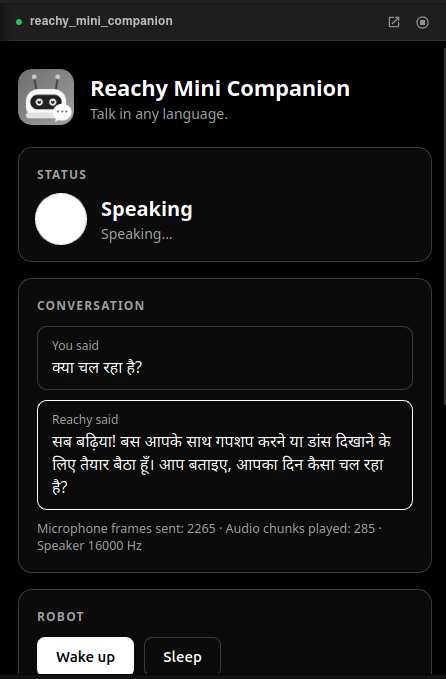
Asked “क्या चल रहा है?” and answered in Hindi
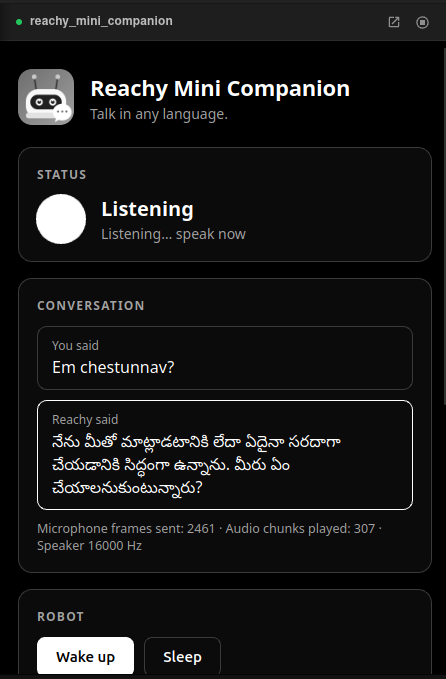
Asked “Em chestunnav?” and answered in Telugu
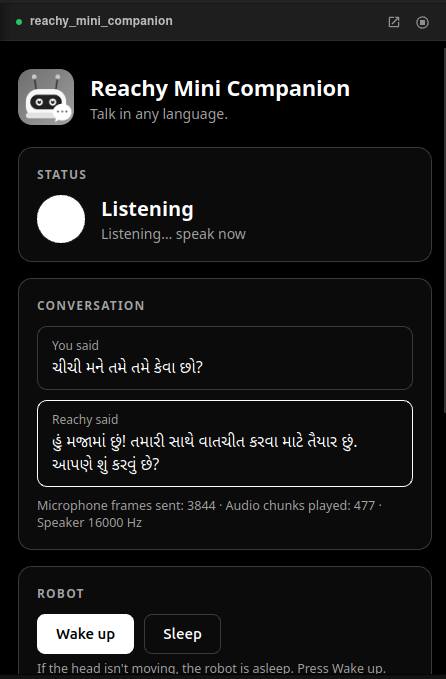
Asked in Gujarati and answered in Gujarati
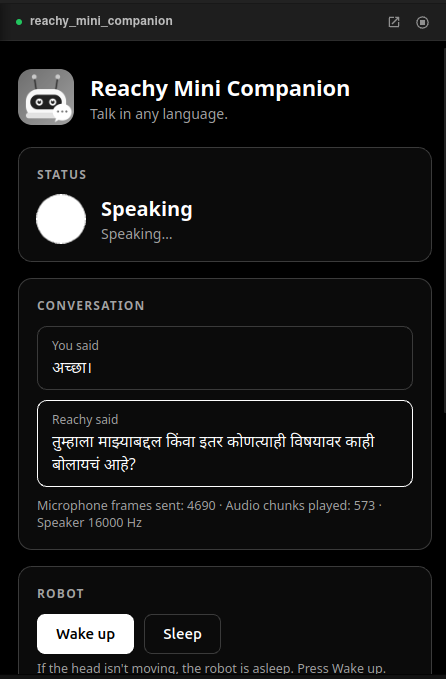
Asked in Marathi and answered in Marathi
How it works
From microphone to speaker
The app runs on the robot as a Reachy Mini app, installed from a Hugging Face Space. The robot's microphone is streamed in small PCM frames to Gemini Live over a WebSocket, and replies are resampled to the speaker's rate and played back, driving a head wobble while the robot talks. The control page on port 7860 polls a small status endpoint about once a second for the live orb, transcript and audio counters.
The voice backend is an explicit setting (gemini by default, or openai), so a stray key for another provider can never switch it.
What I built
Based on Pollen Robotics' open-source app
This started from the Reachy Mini Conversation App by Pollen Robotics, which was OpenAI only. My work:
Gemini Live backend
Session setup, system instructions, microphone and camera streaming, a multi-turn receive loop and audio playback, end to end.
Multilingual
Auto-detect by default, with an optional picker (English, Hindi, Telugu, Spanish, French) that applies live without a restart.
Settings UI
A responsive robot-side interface with live status, conversation, Wake/Sleep, key validation and language, replacing an OpenAI-only page.
Packaging and release
Slimmed dependencies for the robot's slow Wi-Fi, added an icon, thumbnail and landing page, and published the Space.
Debugging
Silent failures I tracked down
Getting a voice robot to actually speak meant finding several failures that gave no clear error.
- Nothing connected at all. The app used a Gemini Live model name that doesn't exist, and the newest SDK defaulted to an API version that serves no Live sessions. Both gave the same opaque HTTP 404. I isolated it by connecting over a raw WebSocket, which worked, and comparing it with the SDK's URL.
- The robot never heard anything. Mic audio was sent with a blob type that doesn't exist in the SDK, and the error was swallowed at debug level. I fixed the type, and an on-page counter now shows how many mic frames were sent.
- It answered once, then went deaf. The SDK's receive() ends after every turn and the app didn't loop around it.
- Crashes on an invalid key or empty audio. Both are now handled and reported on the page. A crash would also put the robot to sleep.
- The head wouldn't lift. The daemon reported motors as enabled while the head was limp. Cycling torque off and on through the daemon API, then playing the wake-up move, fixes it. The app does this automatically, verifies the head height and retries.
- Installing over flaky Wi-Fi. Heavy optional dependencies (mediapipe, jax, opencv-contrib) made the install time out. Moving them to an optional extra made it a light install.
Status
What is verified
Confirmed
Gemini Live replies in Telugu, Hindi and Spanish checked directly against the API. On the robot, live sessions heard and answered Hindi, Telugu, Gujarati, Marathi and Spanish, played audio on the speaker and kept the head level.
Not yet verified
Every pinned-language setting, long conversations, and non-wireless Reachy Mini models.
Install
In the Reachy Mini dashboard, open Discover apps, search for Reachy Mini Companion and install it. Open its settings page at http://<robot-ip>:7860, paste a free Gemini API key and press Test & save.
Built by Ajay Ummadi on the Reachy Mini Conversation App by Pollen Robotics (Apache 2.0). Not affiliated with or endorsed by Pollen Robotics, Hugging Face or Google. Released under the Apache License 2.0.
FAQ
Questions
What is Reachy Mini Companion?
Reachy Mini Companion is a multilingual voice app Ajay Ummadi built for Reachy Mini. It uses the Gemini Live API, detects the language you speak and answers out loud in the same language while the robot moves. It is published as a Hugging Face Space and installs from the Reachy Mini dashboard.
Is it based on another project?
Yes. It started from the open-source Reachy Mini Conversation App by Pollen Robotics (Apache 2.0), which supported OpenAI only. Ajay added the Gemini Live backend, automatic language detection, a new settings page and the packaging. It is not affiliated with or endorsed by Pollen Robotics, Hugging Face or Google.
Do I need an API key?
Yes, a free Gemini API key. Paste it on the app's settings page and press Test & save.