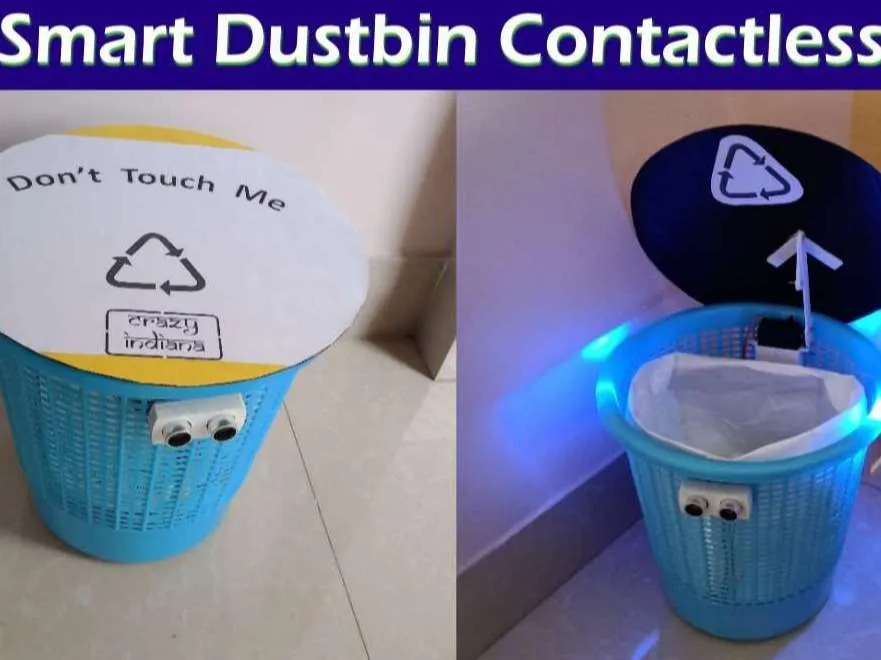
The Smart Dustbin is an innovative hygiene-focused project that automatically opens its lid when it detects a hand approaching. This touchless operation promotes better sanitation and reduces the spread of germs, making it ideal for public spaces, kitchens, and labs. It's a simple yet effective application of sensors and actuators with Arduino.
Components Used:
- Arduino Uno microcontroller board
- HC-SR04 Ultrasonic Sensor
- SG90 Servo Motor
- Small dustbin (or a container to simulate one)
- Cardboard or plastic lid (to be controlled by servo)
- Breadboard
- Jumper Wires
- 5V Power Supply (USB or battery pack)
How it Works:
The ultrasonic sensor continuously measures the distance to objects in front of it. When a hand (or any object) comes within a set range (e.g., 15-20 cm), the Arduino receives this information. It then sends a signal to the servo motor, which rotates to open the dustbin lid. After a short delay (allowing the user to deposit waste), the servo rotates back, closing the lid.
Circuit Connections:
- HC-SR04: `VCC` to Arduino 5V, `GND` to Arduino GND, `Trig` to Arduino Digital Pin X, `Echo` to Arduino Digital Pin Y.
- SG90 Servo Motor: `VCC` (Red wire) to Arduino 5V, `GND` (Brown wire) to Arduino GND, `Signal` (Orange/Yellow wire) to Arduino Digital Pin (e.g., 9).
Arduino Code Snippet (Core Logic):
#include <Servo.h> // Include the Servo library

#define trigPin 9 // Ultrasonic sensor Trig pin
#define echoPin 8 // Ultrasonic sensor Echo pin
#define servoPin 3 // Servo motor signal pin (PWM pin recommended)

Servo myServo; // Create a servo object

long duration;
int distance;

void setup() {
  pinMode(trigPin, OUTPUT);
  pinMode(echoPin, INPUT);
  myServo.attach(servoPin); // Attach the servo to its pin
  myServo.write(0); // Ensure lid starts closed (adjust angle if needed for your setup)
  Serial.begin(9600);
}

void loop() {
  // Clear the trigPin by setting it LOW for 2 microseconds
  digitalWrite(trigPin, LOW);
  delayMicroseconds(2);

  // Set the trigPin HIGH for 10 microseconds to send pulse
  digitalWrite(trigPin, HIGH);
  delayMicroseconds(10);
  digitalWrite(trigPin, LOW);

  // Read the echoPin, returns the sound wave travel time in microseconds
  duration = pulseIn(echoPin, HIGH);

  // Calculate the distance: Speed of sound = 0.034 cm/microsecond
  // Distance = (Travel Time * Speed of Sound) / 2 (for round trip)
  distance = duration * 0.034 / 2;

  Serial.print("Distance: ");
  Serial.print(distance);
  Serial.println(" cm");

  if (distance <= 20) { // If object is within 20 cm
    myServo.write(90); // Open the lid (adjust angle for your setup)
    delay(2000);       // Keep lid open for 2 seconds
  } else {
    myServo.write(0); // Close the lid
  }
  delay(100); // Small delay before next reading
}
Applications:
This concept can be extended to automated dispensers, smart pet feeders, or even sensor-activated entry systems, demonstrating the versatility of simple proximity detection and motion control.